
TL;DR:
- A school digital strategy is a comprehensive plan that aligns technology with educational priorities, not just a procurement list. It emphasizes infrastructure, staff capability, digital citizenship, and measurable benefits, ensuring sustainable digital transformation. Regular reviews and integrated system dependencies are essential for ongoing success and adapting to evolving school needs.
School digital strategy explained simply: it is not a procurement list. Too many schools invest in devices, software licences, and interactive displays, then wonder why outcomes do not improve. A genuine digital strategy aligns technology decisions with your school’s priorities, teaching practices, staff capability, and long-term sustainability. This guide covers everything from foundational planning and infrastructure to digital citizenship, benefit measurement, and practical implementation, drawing on 2026 DfE standards and UK government frameworks so you can build a strategy that actually works.
Table of Contents
- Key takeaways
- What a school digital strategy really covers
- Evaluating your current digital environment
- Digital citizenship and inclusion as strategic priorities
- Quantifying the benefits of your digital strategy
- Practical steps for implementing your strategy
- My honest take on where schools go wrong
- How Eschools supports your digital strategy
- FAQ
Key takeaways
| Point | Details |
|---|---|
| Strategy over purchasing | A digital strategy is a whole-school plan, not a technology shopping list. |
| Infrastructure comes first | Reliable, secure systems are the foundation before any new tools are introduced. |
| Digital citizenship matters | Embedding citizenship competencies across the curriculum shapes safer, more resilient learners. |
| Measure your benefits | Use the UK Government’s benefits framework to track measurable outcomes from the start. |
| Review and adapt | Ongoing oversight and regular reviews keep your strategy aligned with changing school needs. |
What a school digital strategy really covers
Digital transformation is often misunderstood as purchasing more technology. The truth is that buying the right tools without a coherent plan creates fragmentation, wasted budgets, and frustrated staff. A well-constructed school digital strategy takes a whole-school view, connecting every technology decision to your educational priorities, your staff’s workload, and your operational responsibilities.
Think of it this way. Your MIS, your learning management system, your safeguarding software, your communication tools, and your school website are not independent products. They are interdependent systems. When one changes, others are affected. A digital strategy maps those connections so you can make decisions with confidence rather than reacting to problems as they arise.
A strong strategy covers several interconnected areas:
- Teaching and learning: How does technology support curriculum delivery, assessment, and pupil progress tracking?
- Workload and staff capacity: Which tools reduce administrative burden rather than adding to it?
- Infrastructure and reliability: Are your networks, devices, and connectivity fit for purpose across all teaching spaces?
- Cyber security and data protection: Are you meeting the DfE cyber security standard and protecting sensitive data?
- Cost sustainability: Have you reviewed licences, contracts, and total cost of ownership over a three to five year horizon?
- Staff capability: Do your team have the training and confidence to use the tools you have invested in?
Pro Tip: Before approving any new technology purchase, ask how it connects to at least three of the areas above. If you cannot answer clearly, the investment is not yet ready to proceed.
Sustainability and cost planning often get overlooked in the excitement of new technology. A practical digital strategy, reviewed as a coordinated whole-school plan, protects you from the cycle of reactive fixes that drain budgets without delivering lasting improvement.
Evaluating your current digital environment
Before you can plan forward, you need an honest picture of where you are now. Many school leaders skip this step, jumping straight to solutions. A baseline assessment changes everything.
Use the following steps to review your current digital environment:
- Audit your existing systems. List every platform, application, and tool in active use across your school, including those used by individual departments without central approval. You will almost certainly find duplication and gaps.
- Benchmark against DfE standards. The DfE Digital and Technology Standards provide a practical benchmark for infrastructure quality, cyber security, and data governance. Cross-referencing your audit against these standards tells you where your greatest risks lie.
- Assess infrastructure reliability. Survey staff about connectivity issues, device performance, and system downtime. Unreliable infrastructure is the single biggest barrier to technology adoption in classrooms.
- Review your cyber security posture. The DfE core cyber security standard defines expectations around system security and user account controls. Check your compliance honestly, not aspirationally.
- Identify training gaps. Speak directly with classroom teachers, administrators, and support staff. Confident, capable users are the difference between a tool being used well and a licence being wasted. Digital onboarding for staff is frequently the missing piece in school technology plans.
Once you have a clear baseline, you can plan infrastructure improvements with evidence rather than assumption. Balancing innovation with stability is a real tension for school leaders. The goal is not to be first with every new technology; it is to build a reliable ecosystem that staff and students can depend upon every single day.
Digital citizenship and inclusion as strategic priorities

A school digital strategy that focuses only on devices and connectivity misses something significant. How your pupils behave online, how they think critically about digital information, and whether all members of your school community can access your digital services — these are strategic questions, not pastoral afterthoughts.
Digital citizenship moves beyond online safety lessons to integrate five core competencies across curriculum, behaviour policy, safeguarding, and wellbeing. The ISTE DiGCit framework defines these as:
- Balanced: Managing screen time and maintaining healthy digital habits
- Informed: Evaluating sources critically and resisting misinformation
- Inclusive: Communicating respectfully and upholding dignity online
- Engaged: Participating positively in civic and community digital life
- Alert: Protecting privacy, managing digital footprints, and recognising risk
Embedding these as continuous practice rather than one-off lessons creates genuinely resilient digital citizens. It also strengthens your safeguarding framework and supports Ofsted’s expectation that schools prepare pupils for life in modern Britain.
Digital inclusion deserves equal attention. The GOV.UK 2026 Digital Inclusion Action Plan makes clear that accessible digital services must be designed with offline routes preserved. For schools, this means designing for inclusion from the start: phone lines must remain available, paper-based processes cannot simply be removed, and parents with limited digital access need alternative pathways. A strategy that digitalises everything without considering those who cannot or will not engage online is incomplete.
| Inclusion area | Strategic consideration |
|---|---|
| Parent communication | Maintain letter and phone options alongside digital messaging |
| Pupil device access | Account for pupils without home devices or reliable internet |
| Staff digital confidence | Provide training pathways, not just access |
| Accessibility standards | Meet WCAG 2.1 AA for all publicly facing digital content |
Quantifying the benefits of your digital strategy
School leaders are increasingly expected to demonstrate value for money. A digital strategy without measurable outcomes is difficult to defend to governors, trustees, or Ofsted. Fortunately, practical frameworks exist to help you build an evidence base.
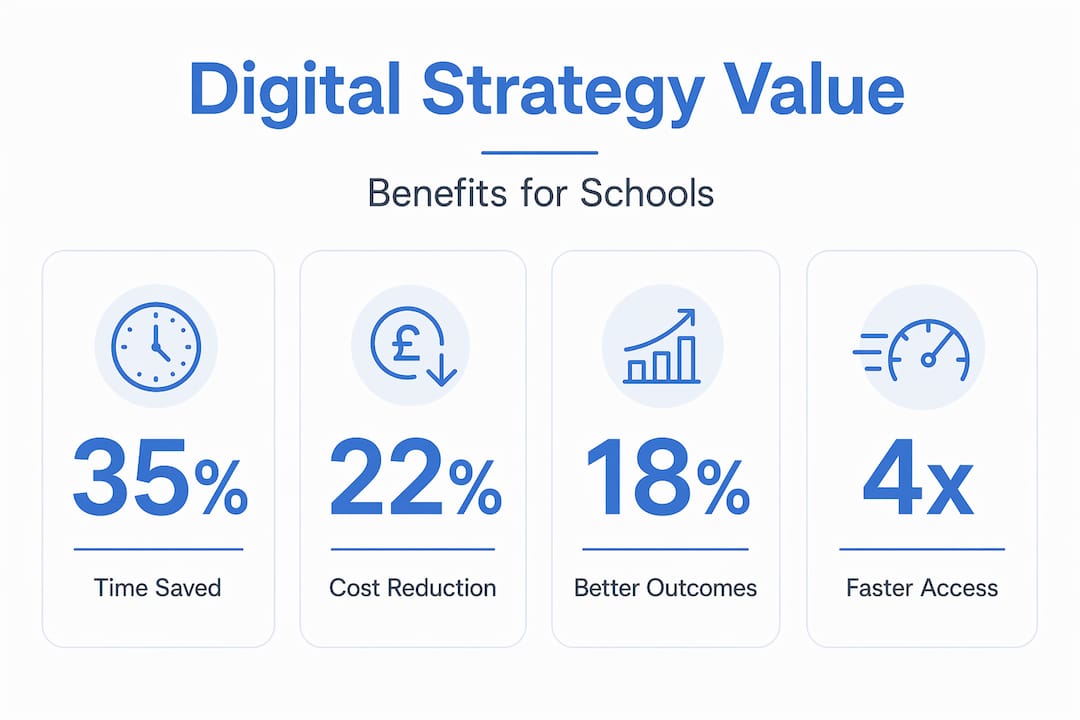
The UK Government’s Digital and Data Benefits framework provides structured methods for quantifying the value of digital programmes. It identifies three primary benefit streams relevant to schools:
| Benefit stream | What it measures | School example |
|---|---|---|
| Productivity | Time saved on tasks | Automated parent communications replacing manual calls |
| Channel shift | Moving processes to lower-cost digital routes | Online parent evening booking replacing paper slips |
| Effectiveness | Improved outcomes or quality | Better pupil progress tracking leading to earlier intervention |
Benefit quantification frameworks enable decision-makers to build stronger economic cases for digital investment. This matters enormously when presenting proposals to governors or seeking funding support. Without this, you risk presenting a wish list rather than a costed, evidenced business case.
Pro Tip: Set your benefit metrics before a project begins, not after. Defining what success looks like at the start means your data is unimpeachable when you report back to your governing board.
Tracking benefits early also helps you avoid a common failure pattern: projects that deliver anecdotal improvements but cannot demonstrate measurable change. Governors and MAT leaders are right to ask for evidence. Having the framework in place from day one means you can answer them confidently.
Practical steps for implementing your strategy
Having a plan is one thing. Executing it without disrupting your school’s day-to-day operation is another matter entirely. The hardest part of execution is managing dependencies across multiple systems, particularly where MIS, LMS, safeguarding tools, finance software, and communication platforms intersect.
Here is a practical approach to implementation that minimises risk:
- Map your system dependencies first. Before changing any platform, document how it connects to your other systems. Switching your MIS without understanding its data feeds to your safeguarding software, for example, can create serious compliance gaps.
- Prioritise an integrated ecosystem over individual apps. Shifting to shared data platforms and consistent workflows delivers far greater efficiency than adding standalone tools. Think in terms of ecosystems, not individual applications.
- Phase your implementation. Avoid changing too many systems simultaneously. Pilot with one year group, one department, or one process, measure the results, and then scale.
- Build staff confidence through structured training. Ongoing support and training are non-negotiable parts of any successful digital strategy. Technology that staff do not trust or understand will not be used.
- Schedule regular strategy reviews. Your digital environment will change. New risks emerge, new tools become available, and your school’s priorities evolve. Build a formal review cycle into your strategy, at minimum annually, to stay aligned and responsive.
Effective school technology implementation is not a one-time project. It is an ongoing responsibility that sits with school leaders, IT coordinators, and governors collectively.
My honest take on where schools go wrong
I have worked with enough schools to see the same pattern repeat. Leadership approves a new platform, IT installs it, a brief demonstration is given to staff, and then nothing changes. Six months later, the platform is being used by three enthusiastic teachers while everyone else has quietly gone back to their previous methods.
The problem is not the technology. It is the absence of joined-up planning. When your digital strategy treats each tool in isolation, you lose sight of how the whole school operates as a system. You end up with conflicts: a communication platform that does not talk to your MIS, a safeguarding system that creates duplicate data entry, a parent app that nobody checks because email still exists alongside it.
What I have learned is that the schools making real progress are the ones that treat their digital strategy as a living document, reviewed termly rather than filed away after the initial planning day. They assign clear ownership: someone knows whose job it is to monitor each system, manage contracts, and flag when something is not working.
The other thing I would say plainly: do not let the perfect be the enemy of the good. A clear, practical strategy covering your ten most important systems is worth infinitely more than an ambitious hundred-page document that collects dust. Start with what you have. Assess it honestly. Plan from there.
— Ed
How Eschools supports your digital strategy
If you are ready to move from planning to action, Eschools has supported UK schools and multi-academy trusts for over 14 years with practical, proven digital solutions.

From bespoke school websites that improve parent engagement and meet statutory compliance requirements, to MAT-wide digital platforms that give central teams oversight without removing school autonomy, Eschools builds solutions around your priorities. Communication tools, online learning platforms, and parent evening booking systems are all designed to work together rather than add complexity. You can explore the full range of schools Eschools has worked with and the results delivered through our work. If you want a trusted partner who understands UK education, talk to the Eschools team today.
FAQ
What is a school digital strategy?
A school digital strategy is a whole-school plan that aligns technology decisions with teaching, learning, operational, and safeguarding priorities. It goes well beyond purchasing devices to cover infrastructure, staff capability, cyber security, and long-term sustainability.
How do I start creating a digital strategy for my school?
Begin with a baseline audit of every system your school currently uses, benchmark against DfE Digital and Technology Standards, identify infrastructure gaps, and set measurable benefit targets before making any new investments.
What are the main benefits of a digital strategy in education?
Benefits include time savings through automation, cost reductions through channel shift, improved pupil outcomes through better data use, and stronger compliance with DfE and Ofsted expectations. The UK Government’s benefits framework provides a structured method for measuring all three.
Why does digital citizenship belong in a school digital strategy?
Digital citizenship shapes how pupils behave, think critically, and engage safely online. Embedding citizenship competencies across the curriculum and behaviour policy strengthens safeguarding and prepares pupils for life beyond school.
How often should a school digital strategy be reviewed?
At minimum, annually. Schools should also carry out a review whenever significant changes occur, such as adopting a new MIS, changes in DfE guidance, or following a cyber security incident. A living strategy adapts to your school’s changing needs rather than becoming a static document.