
TL;DR:
- An effective EdTech implementation follows a structured, sequential cycle of planning, piloting, deciding, and sustaining to ensure meaningful adoption. The ALIGN framework emphasizes assessing instructional needs and embedding technology through continuous support, not just tool deployment. Adequate vetting, staffing, and ongoing professional development are critical to sustain successful digital integration in schools.
An educational technology implementation workflow is a structured, repeatable process of planning, piloting, scaling, and sustaining digital tools to improve learning outcomes and teaching practice. Without this structure, schools frequently adopt tools reactively, leaving teachers under-supported and pupils underserved. Frameworks like the ALIGN framework and the BookWidgets pilot-to-scale model give school leaders a disciplined sequence that connects instructional goals to technology choices. CoSN’s 2026 vetting and security guidelines add a further layer of governance that UK schools cannot afford to ignore.
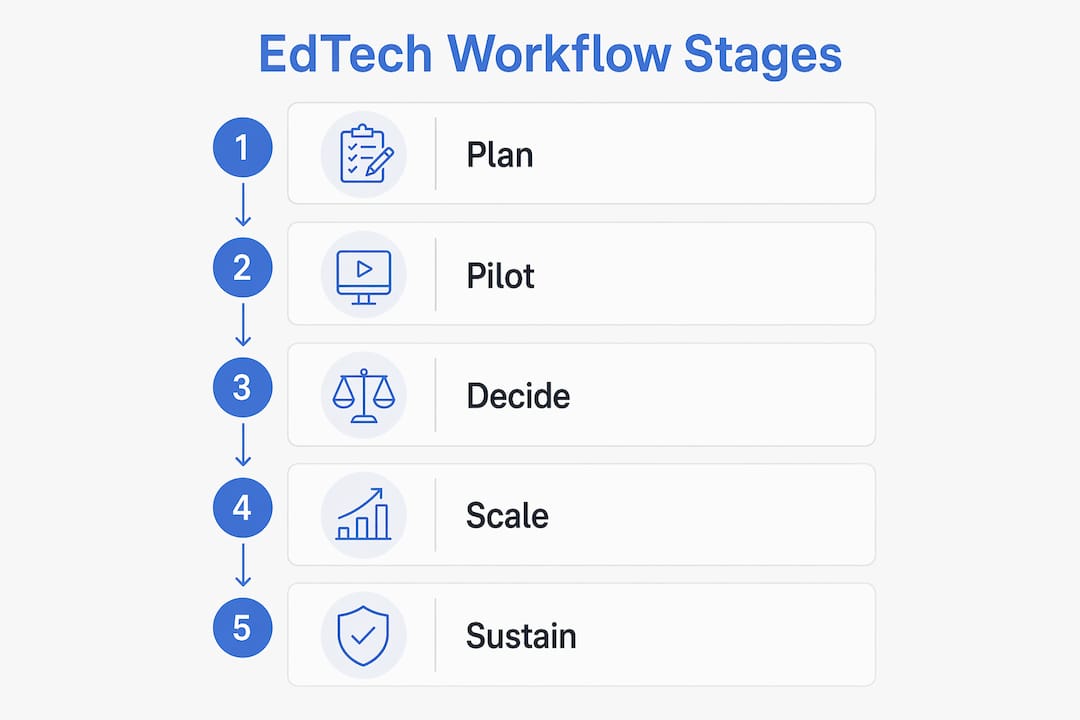
What are the essential stages of an educational technology implementation workflow?
The recognised industry term for this process is EdTech implementation lifecycle, and it maps directly onto the academic calendar. Pilot → Decide → Scale → Sustain is the four-phase sequence most widely used by school districts, and each phase has a clear purpose that prevents the most common failure mode: scaling before you have evidence.

The table below shows how each phase aligns to the school year, what activities it contains, and what outcome it produces.
| Phase | Timing | Key activities | Outcome |
|---|---|---|---|
| Plan and build | May to August | Define goals, select participants, prepare materials | Readiness confirmed |
| Pilot | October to November | Four-week classroom trial, structured feedback | Evidence collected |
| Decide | November to December | Review data against budget cycle | Go/no-go decision |
| Onboard and scale | January to April | Two-week cohorts, peer support | Confident adoption |
| Sustain | Year 2 onwards | Professional development, resource sharing | Embedded practice |
Planning in May and June gives you the summer to build classroom materials and configure systems before pupils return. The pilot window in October and November is deliberately short. A four-week pilot gathers enough real classroom data to inform a decision without committing the whole school. Aligning the decision review to November and December is not arbitrary. Budget cycles in most UK schools close in the spring term, so a December decision gives procurement teams time to act.
Pro Tip: Set your success metrics before the pilot begins, not after. Decide in advance what attendance, engagement, or attainment data would constitute a credible case for scaling. This removes post-hoc rationalisation from the decision.
How does the ALIGN framework guide effective EdTech implementation?
The ALIGN framework is a five-pillar sequence designed to embed educational impact rather than simply deploy tools. Its value lies in the order of the pillars. Schools that skip the first two steps and jump straight to integration consistently report lower adoption rates and higher teacher frustration.
The five pillars are:
- Assessment. Identify the instructional problem before selecting any tool. What specific learning gap or teaching challenge are you trying to address?
- Logistics. Remove practical friction. This means confirming device availability, connectivity, data protection compliance, and security clearance before a single lesson is planned.
- Integration. Align the tool with pedagogy using established frameworks. SAMR (Substitution, Augmentation, Modification, Redefinition) and TPACK (Technological Pedagogical Content Knowledge) both provide structured ways to evaluate whether technology enhances learning or merely replicates what a textbook already does.
- Growth. Provide ongoing teacher support. One-off training sessions do not produce sustained change. Coaching, peer observation, and job-embedded learning are the mechanisms that move teachers from reluctant users to confident practitioners.
- Navigation. Evaluate continuously. Use feedback loops and digital maturity assessments to judge whether the tool is delivering the outcomes you identified in the Assessment pillar.
“ALIGN’s ordered pillars help avoid common pitfalls such as integrating technology before clarifying instructional needs or removing operational friction.” — eLearning Industry
The Integration pillar deserves particular attention. SAMR asks whether a tool merely substitutes for an existing method or genuinely redefines what is possible in the classroom. TPACK goes further, asking whether the teacher has the content knowledge, pedagogical skill, and technical fluency to use the tool effectively. Both frameworks are free to use and widely documented. Applying either one during your planning phase will sharpen your tool selection considerably.
What prerequisites and vetting processes ensure a secure and supported implementation?
Vetting is not optional. 86% of districts vet free educational tools before use, 65% require IT review, and 61% maintain approved applications lists. These figures reflect a sector-wide recognition that free tools carry real data protection and cybersecurity risks that schools cannot absorb.
The current state of AI governance is encouraging but incomplete. Nearly 80% of districts have established AI guidelines in 2026, closing a gap that was a significant concern just two years ago. However, the staffing picture tells a different story. Lack of instructional technology support affects 58% of districts, and cybersecurity staffing shortfalls affect 65%. Approving a tool without the staff to support it is a workflow failure, not a technology failure.
A sound vetting process for UK schools covers four areas:
- Data protection. Does the tool comply with UK GDPR and the Children’s Code? Has the supplier completed a Data Protection Impact Assessment?
- IT review. Has your IT coordinator or managed service provider confirmed compatibility with existing infrastructure and network security policies? You can find practical guidance on securing online learning in the Eschools resource library.
- Approved list. Is the tool added to a maintained catalogue that staff can consult before adopting new applications independently?
- Support capacity. Does your school have the staffing or contracted support to train teachers and troubleshoot issues after deployment?
Treating tool vetting and instructional support as a unified workflow is the single most effective way to avoid approving tools that then sit unused because no one has the capacity to embed them.
What are the step-by-step best practices for piloting and scaling EdTech?
Executing the technology in education process well requires discipline at each phase. The following sequence draws on the BookWidgets pilot-to-scale model and reflects best practice for UK school contexts.
- Define your goals and participants. Select two or three teachers who are willing early adopters, not the most enthusiastic technologists. Willing adopters represent the average teacher more accurately and produce more transferable evidence.
- Prepare materials during the build phase. Align classroom resources with your existing curriculum schemes of work. A tool that requires teachers to rebuild their lesson plans from scratch will not survive beyond the pilot.
- Run a structured four-week pilot. Collect feedback at week two and week four using a short, consistent survey. Track pupil engagement data where the platform provides it. Separating the pilot from onboarding prevents premature scaling and gives you clean data.
- Conduct a decision review in November or December. Present pilot findings against your pre-defined success metrics. Cross-reference with your budget timeline. A go decision at this stage triggers procurement and onboarding planning for January.
- Onboard in two-week cohorts. Grouping teachers into cohorts of eight to twelve prevents the support team from being overwhelmed. Pair each cohort with a pilot teacher who can share first-hand experience.
- Sustain through structured professional development. Professional coaching and peer sharing are the mechanisms that move EdTech from novelty to embedded practice. Schedule termly review sessions and maintain a shared resource bank that teachers can contribute to.
Pro Tip: Build a one-page implementation record for each tool you adopt. Include the original instructional need, pilot outcomes, onboarding dates, and the name of the staff member responsible for ongoing support. This single document prevents institutional memory loss when staff change roles.
What common challenges arise in technology adoption workflows and how to address them?
The most persistent bottleneck in technology adoption in schools is not resistance to change. It is structural under-resourcing. When 58% of districts report instructional technology staffing shortfalls and 65% report cybersecurity staffing gaps, the workflow breaks down not at the planning stage but at the support stage.
“Embedding ‘right-sized’ evidence into workflows, maintaining feedback loops to adapt implementation” is the core shift required to move from policy to consistent classroom use. — EdTech Hub
The equity dimension is equally significant. Digital divide concerns affect schools where pupils lack reliable home internet access or where device provision is inconsistent across year groups. An implementation strategy for EdTech that ignores home access will produce engagement gaps that undermine your pilot data. Conduct a device and connectivity audit before you begin.
Teacher confidence is the third major challenge. Teachers who feel exposed by technology they do not fully understand will disengage quietly rather than raise concerns openly. The solution is not more training days. It is ongoing, embedded support that meets teachers where they are, in their classrooms, during their planning time.
Finally, avoid the trap of integrating technology before you have assessed instructional need. The ALIGN framework exists precisely because schools repeatedly select tools first and then search for a problem they might solve. This sequence produces low adoption, wasted budget, and teacher cynicism that makes the next implementation harder.
Key takeaways
A successful educational technology implementation workflow depends on sequencing: needs assessment before tool selection, vetting before deployment, and sustained support before scaling.
| Point | Details |
|---|---|
| Follow the four-phase lifecycle | Plan, pilot, decide, and sustain in sequence to avoid premature scaling. |
| Use ALIGN to structure decisions | Start with instructional need, not tool selection, to produce meaningful adoption. |
| Vet every tool before deployment | 86% of districts vet free tools; align approval with your support capacity. |
| Run a four-week pilot | Collect structured feedback at weeks two and four before committing to full rollout. |
| Sustain through peer collaboration | Coaching and shared resources move EdTech from initial launch to embedded practice. |
What I have learned about sustainable EdTech implementation
The schools that implement technology well share one habit: they are relentlessly needs-first. They do not ask “what can this tool do?” They ask “what problem are we trying to solve, and is this the right instrument for it?” That distinction sounds simple, but in practice it requires considerable discipline when suppliers are persuasive and budgets feel like they must be spent.
Pilot data is genuinely powerful when it is collected honestly. I have seen schools present pilot findings that were so carefully curated they told the decision-makers nothing useful. The point of a four-week pilot is to surface friction, not to confirm a decision already made. If the data shows that teachers found the tool confusing or that pupil engagement dropped in week three, that is exactly the information you need.
The vetting and support alignment point is one that many school leaders underestimate until they have approved a tool that then sits dormant because no one has the capacity to train staff. Aligning your EdTech readiness assessment with your staffing reality before you approve anything is not pessimism. It is good governance.
Sustaining momentum beyond the initial rollout is where most implementations quietly fail. The energy that surrounds a launch dissipates within a term. Structured peer collaboration, termly reviews, and a maintained resource bank are not optional extras. They are the mechanism by which technology becomes part of how your school teaches, rather than a project that happened once.
— Ed
How Eschools supports your school’s digital implementation

Eschools has supported UK schools and multi-academy trusts for over 14 years, providing digital tools that complement every stage of your EdTech implementation process. From bespoke school websites that keep parents informed during rollout phases, to communication tools that support staff coordination across onboarding cohorts, Eschools builds solutions around how schools actually work. If you lead a multi-academy trust, the MAT website solutions provide centralised control with the flexibility each school needs. Explore the Eschools portfolio to see how schools like yours have used these tools to strengthen their digital foundations and support long-term technology adoption.
FAQ
What is an educational technology implementation workflow?
An educational technology implementation workflow is a structured sequence of phases, typically Plan, Pilot, Decide, Scale, and Sustain, that guides schools from identifying an instructional need through to embedding a digital tool in everyday teaching practice.
How long should an EdTech pilot last?
A four-week classroom pilot is the recommended duration, as it generates enough real usage data to inform a credible adoption decision without overcommitting staff time or budget.
What is the ALIGN framework in EdTech?
ALIGN is a five-pillar implementation sequence covering Assessment, Logistics, Integration, Growth, and Navigation. It is designed to ensure schools start from educational problems rather than technology tools.
How do schools vet EdTech tools before adoption?
86% of districts vet free tools before use, typically through IT review, data protection assessment, and inclusion on an approved applications list. Vetting should always be paired with a review of available support capacity.
Why do EdTech implementations fail after the initial launch?
Most post-launch failures result from insufficient ongoing support. One-off training sessions do not sustain adoption. Professional coaching, peer collaboration, and structured review cycles are required to move technology from a launch event to embedded classroom practice.