
TL;DR:
- Digital onboarding automates facilitate compliance, data management, and staff engagement before their first day.
- It reduces administrative workload, accelerates readiness, and creates consistent, personalised experiences for new staff and pupils.
Most school administrators know the feeling: a new member of staff arrives on their first day, and someone is still chasing a DBS certificate, a signed contract sits unsigned in an email inbox, and the emergency contact form has gone missing in a paper pile. This is what onboarding looks like without a digital process. Understanding what is digital onboarding for schools is the first step towards eliminating that chaos entirely. It is not simply moving paperwork online. It is a fundamental shift in how schools manage compliance, data, and the experience of every new joiner, from teaching staff to reception-year pupils.
Table of Contents
- What digital onboarding means for schools
- Core features of digital onboarding software for UK schools
- Benefits and challenges of adopting digital onboarding in schools
- Digital onboarding for pupil transitions: securing early years and SEND data
- Ensuring compliance and security in school digital onboarding
- Rethinking digital onboarding: more than just technology
- Explore digital onboarding and school communication solutions with eSchools
- Frequently asked questions
Key Takeaways
| Point | Details |
|---|---|
| Digital onboarding defined | It automates staff and pupil induction workflows, saving time and reducing paperwork for UK schools. |
| Core onboarding features | Includes digital form completion, e-signatures, compliance tracking, and automated reminders. |
| Compliance and security | Uses Single Sign-On and secure audit trails to meet UK GDPR and education regulations. |
| Supports pupil transitions | Digital passports share SEND and safeguarding data early for effective school readiness. |
| Focus on human connection | Successful onboarding balances technology with personalised workflows that build school culture. |
What digital onboarding means for schools
Digital onboarding for schools is the process of using software to manage, automate, and track every step of inducting new staff and pupils. That includes contract generation, document collection, compliance verification, e-signatures, and welcome communications, all handled through a single platform before the individual even sets foot on site.
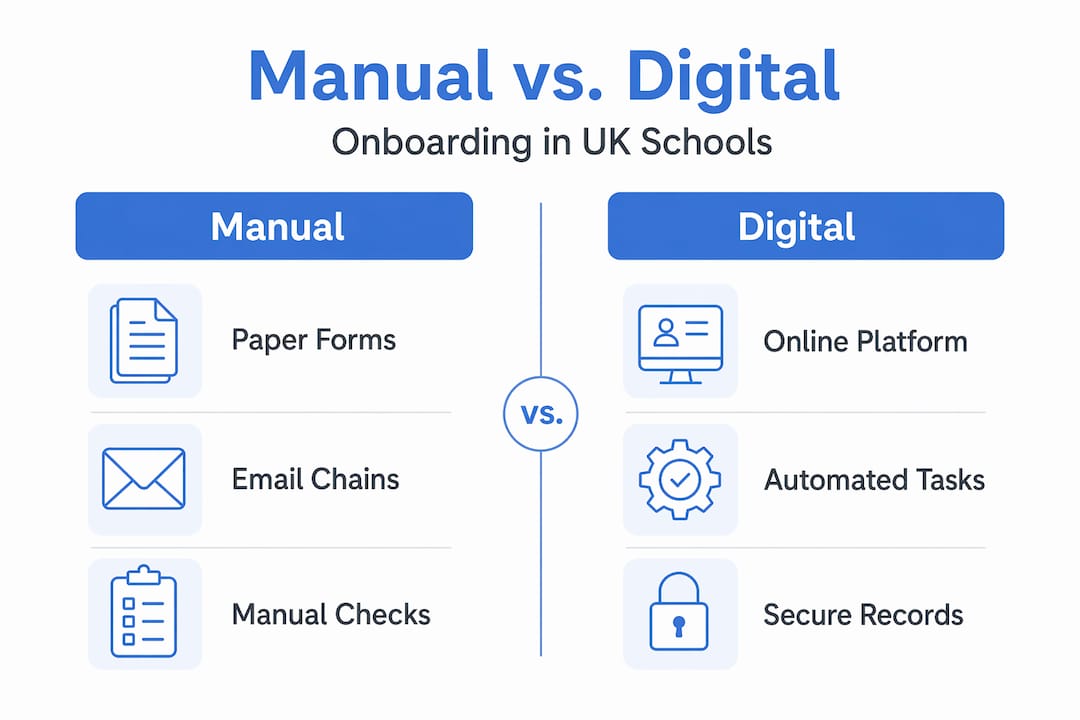
The contrast with manual processes is stark. Paper-based onboarding relies on physical forms, email chains, and manual chasing. Digital onboarding replaces all of that with automated workflows that trigger at the right moment, send reminders automatically, and flag anything that is missing before it becomes a problem.
Digital engagement in UK schools is already transforming how schools communicate with parents and pupils. Digital onboarding extends that same logic inward, to how schools manage their own people and processes. The results are measurable: automating onboarding tasks such as contract creation, document management, approvals, and e-signatures can reduce associated costs by up to 80% and accelerate new staff productivity significantly.
Key benefits include:
- Faster time-to-readiness for new staff, with all compliance checks completed before the first day
- Reduced administrative burden on office managers and HR leads who no longer chase documents manually
- Consistent experience for every new joiner, whether a teaching assistant, a supply teacher, or a newly appointed headteacher
- Improved data accuracy because information is entered once at source rather than transcribed from paper forms
- Personalised welcome journeys that communicate school values and culture from the moment an offer is accepted
Personalisation matters more than many schools realise. A new teacher who receives a tailored welcome pack, access to their timetable, and a clear checklist of what to expect feels valued before they arrive. That early engagement has a direct impact on staff retention and commitment, particularly important given the current pressures on teacher recruitment across England and Wales.
Core features of digital onboarding software for UK schools
Now that we know what digital onboarding involves, it is worth examining the specific features that make school onboarding software effective in practice.
The best platforms available to UK schools include the following capabilities:
-
Online form completion and document upload. New staff complete all required forms and upload identity documents, qualifications, and DBS certificates through a secure online portal. New hires complete forms and upload documents before day one, with automated reminders and compliance tracking workflows specifically customised for UK schools. This eliminates the most common source of onboarding delay.
-
Electronic signatures. Contracts, policies, and declarations are signed digitally with a legally valid e-signature. There is no need to print, post, or scan documents. The signed record is stored securely and is instantly retrievable during an Ofsted inspection or audit.
-
Automated reminders. The system monitors which tasks are outstanding and sends reminders to the new joiner or the relevant administrator. This is one of the most practical features in a busy school office, where staff cannot realistically track every pending action manually.
-
Customisable compliance workflows. UK schools have specific statutory obligations, from safer recruitment checks to data protection declarations. Good school onboarding software allows you to build workflows that map to your exact requirements, including those set by your multi-academy trust or local authority.
-
Centralised document management. All onboarding records are stored in one place with role-based access controls. This makes audit preparation straightforward and reduces the risk of documents being mislaid or accessed by unauthorised individuals.
-
Integration with existing school systems. The strongest digital onboarding tools for education connect with your management information system (MIS), so staff records are created automatically without duplicate data entry.
To support schools in understanding how to streamline UK school administration, it helps to think of each feature not as a standalone tool but as part of a connected process. When every step links to the next, the whole experience becomes far less fragmented.
Pro Tip: Before selecting a platform, map out your current onboarding steps on paper. Identify the three tasks that cause the most delays or errors. Any software you consider should address those three points directly, or it is not the right fit for your school.
Benefits and challenges of adopting digital onboarding in schools
Having outlined features, it is important to weigh both the advantages and the real difficulties schools encounter when making the transition.
The benefits are substantial:
- Schools that automate repetitive onboarding tasks typically save several hours of administrative time per new hire, time that can be redirected towards pupil-facing work
- Compliance tracking becomes proactive rather than reactive, with the system alerting you to gaps before an inspection rather than after
- Audit trails are created automatically, giving you verifiable evidence that every safer recruitment check was completed, dated, and recorded
- New staff engagement improves when the process is smooth and professional, reinforcing the impression that your school is well-organised and values its people
- Multi-academy trusts benefit particularly, as consistent onboarding processes can be applied across all schools in the trust from a single platform
Digital onboarding cuts manual tasks, improves compliance, and helps build school culture through personalised workflows that focus on human connection rather than administrative friction.
The challenges are real but manageable:
“The biggest barrier to digital onboarding in schools is not the technology itself. It is the assumption that the existing process works well enough. It rarely does.”
The most common difficulties schools report include:
- Technology readiness. Staff who are less confident with digital tools may find a new platform daunting initially. Adequate training and a phased rollout address this directly.
- Device availability. Some school offices still lack sufficient secure devices for both administrators and new joiners to access the system simultaneously.
- Change management. Persuading experienced office staff to abandon familiar processes takes time and clear communication about why the change benefits them personally.
Understanding school communication software benefits provides useful context here. The schools that succeed with digital adoption are those that frame it as reducing workload, not adding to it.
Digital onboarding for pupil transitions: securing early years and SEND data
Beyond staff onboarding, digital processes also transform pupil transitions, particularly for SEND and early years admissions where the quality of information shared between settings directly affects a child’s start.

The traditional approach to nursery-to-reception transition involves paper-based transition forms that are often incomplete, arrive late, or are lost between settings. Teachers in September are frequently preparing support for children about whom they know very little. Digital onboarding changes this meaningfully.
| Traditional transition approach | Digital transition approach |
|---|---|
| Paper forms completed by nursery staff | Digital passports completed by parents and keyworkers |
| Data arrives in September or later | Data available weeks before term starts |
| SEND information often incomplete | SEND flags captured systematically and securely |
| No safeguarding data shared by default | Safeguarding concerns documented and shared securely |
| No audit trail | Full record of what was shared, when, and by whom |
Platforms focused on early years transition, such as StepIntoSchool, complete digital passports covering SEND, development, and safeguarding data in just 10 to 15 minutes per child, with all information shared securely before the September intake begins. For a reception teacher with thirty new starters, receiving that data in July rather than September is genuinely transformative.
For SEND coordinators specifically, early data availability means support plans can be drafted, resources ordered, and external agency referrals initiated before the child walks through the door. That is not a marginal improvement. It is the difference between reactive and planned support.
Pro Tip: If you are planning a digital transition for your early years intake, involve your nursery and pre-school partners in the process early. Their willingness to complete digital passports is the variable that determines whether the system works in practice.
Schools investing in digital engagement for pupil transitions consistently report stronger relationships with feeder settings and more confident staff entering the new academic year.
Ensuring compliance and security in school digital onboarding
Finally, it is worth examining how digital onboarding supports schools’ legal obligations under UK data protection law and wider regulatory frameworks.
Compliance is not optional. Under UK GDPR and the Data Protection Act 2018, schools must process personal data lawfully, securely, and with clear purpose. Manual onboarding processes present a genuine risk: paper forms are lost, emails are forwarded incorrectly, and there is often no record of when a document was received or reviewed. Digital onboarding addresses each of these vulnerabilities directly.
Key compliance and security features include:
- Verifiable audit trails. Every action within the onboarding workflow is time-stamped and attributed to a specific user. This gives you defensible evidence during an Ofsted inspection or a data subject access request.
- Role-based access controls. Only authorised staff can view sensitive onboarding data, reducing the risk of accidental or inappropriate disclosure.
- Single Sign-On (SSO). Using Single Sign-On in digital onboarding minimises the volume of personal data shared across systems and secures access in accordance with UK GDPR requirements. It also reduces password fatigue for staff, which is a practical security benefit that many schools overlook.
- Automated credential tracking. The system monitors when DBS certificates, qualifications, and mandatory training records are due for renewal, alerting the relevant administrator before a deadline is missed.
- Secure document storage. All onboarding records are encrypted and stored with retention schedules aligned to DfE and statutory guidance.
Understanding your digital presence and compliance obligations is increasingly important for governing bodies as well as headteachers. Digital onboarding is one of the clearest examples of technology reducing compliance risk rather than creating it.
Rethinking digital onboarding: more than just technology
Here is the perspective that many articles on this subject miss entirely. Schools that treat digital onboarding as a technology project tend to get the technology working and miss the point. Schools that treat it as a people project, supported by technology, are the ones that see meaningful change.
The evidence for this is consistent. Automating credential tracking and compliance checks frees up time that should be redirected towards human interaction: a welcome call from the headteacher, a buddy system pairing new staff with experienced colleagues, a personalised first-week itinerary. Technology creates the space for those moments. It does not replace them.
There is also the question of feedback. Most schools implement an onboarding process and leave it unchanged for years. The schools that use school administration software insights to continuously refine their approach, asking new starters what worked and what did not, develop processes that genuinely reflect their culture rather than simply meeting a compliance checklist.
Our view at eSchools, shaped by over 14 years of working with UK schools, is this: the schools that thrive with digital adoption are those that start with a clear question. Not “what does this software do?” but “what does a great first week feel like for someone joining our school, and how does technology support that?” Answer that question first, and the choice of tools becomes far more straightforward.
Explore digital onboarding and school communication solutions with eSchools
Understanding the value of digital onboarding is one thing. Finding tools that fit your school’s specific context, size, and compliance requirements is another challenge entirely.

At eSchools, we have spent over 14 years building digital solutions that work for UK schools without adding unnecessary complexity. From bespoke school websites built for engagement to integrated communication platforms that keep parents informed and staff connected, our tools are designed around how schools actually operate. Explore what eSchools can offer your school or multi-academy trust, and discover how our approach to digital engagement supports both operational efficiency and meaningful communication. You can also read more about school communication software to understand how the pieces fit together. Get in touch to arrange a tailored demonstration and see exactly how our solutions map to your school’s needs.
Frequently asked questions
What is digital onboarding for schools?
Digital onboarding is the process of using software to automate and manage new staff and pupil induction, including document submission, compliance tracking, and e-signatures completed online before their start date. Automating these tasks speeds new staff readiness and significantly improves compliance accuracy.
How does digital onboarding improve compliance in UK schools?
It creates verifiable audit trails of every onboarding step, ensures all required documents are collected before the start date, and uses secure workflows and Single Sign-On to protect personal data. Single Sign-On is crucial for UK GDPR data minimisation and secure access management.
Can digital onboarding support pupil transitions and SEND data sharing?
Yes. Platforms built for early years transition help nurseries and schools share comprehensive SEND and safeguarding data securely before term begins, enabling tailored support from day one. StepIntoSchool shares SEND data before the September intake, giving schools weeks to prepare rather than hours.
What are common challenges when implementing digital onboarding in schools?
The most frequent challenges are staff technology readiness, insufficient training, and ensuring secure devices are available for all users. Schools need adequate devices with multi-factor authentication and proper training to avoid disruptions during assessments or onboarding activities.
How can digital onboarding enhance school culture from day one?
By automating routine compliance tasks, digital onboarding frees time for personalised interactions and uses customised workflows to build relationships with new staff from the moment they accept an offer. Automated credential tracking enables schools to focus genuinely on human connection rather than administrative catch-up.