TL;DR:
- Many school leaders mistakenly believe that accessibility solely involves larger text or high-contrast colors, but it actually requires inclusive design supporting all users in real-life situations. UK schools must comply with legal accessibility regulations that demand ongoing efforts to ensure their websites are perceivable, operable, and understandable for everyone in the school community. Implementing systematic audits, following WCAG AA standards, and embedding accessibility into content workflows can significantly enhance community trust and engagement.
Many school leaders assume that an accessible website is simply one with larger text or high-contrast colours for visually impaired users. In reality, accessibility reaches far further than that. It touches every parent trying to book a parents’ evening on a mobile phone, every student with dyslexia navigating a homework page, and every member of staff relying on a screen reader to access staff resources. In the UK, public sector accessibility obligations are legal requirements, not optional best practice. This guide cuts through the confusion, explains what the law demands, and gives you a clear, practical path to making your school website genuinely accessible.
Table of Contents
- What school website accessibility really means
- Legal requirements and why they matter
- Understanding the Web Content Accessibility Guidelines (WCAG)
- How to make your school website accessible: practical steps
- Common pitfalls and how to avoid them
- Why website accessibility is a catalyst for better school engagement
- Making accessibility easy for your school
- Frequently asked questions
Key Takeaways
| Point | Details |
|---|---|
| Accessibility is legally required | UK schools must make their websites usable for everyone, including those with disabilities. |
| WCAG level AA is the benchmark | Meeting AA under the WCAG ensures compliance and better user experience for your school’s community. |
| Accessibility is ongoing | Conduct regular audits and keep accessibility at the heart of your school’s digital development. |
| Accessible sites boost engagement | An inclusive website strengthens trust and communication with students, parents, and staff. |
What school website accessibility really means
Accessibility is not a design trend or a technical nicety. It is a commitment to ensuring that every person in your school community, regardless of their needs, can use your website fully and confidently.
As the DfE’s accessibility manual states:
“School website accessibility means designing and developing the school’s public website so that people with disabilities can perceive, understand, and operate the content and interface.”
That definition is broader than most people expect. It covers a wide range of impairments and situations that affect how people interact with digital content:
- Visual impairments: including blindness, low vision, and colour blindness
- Hearing impairments: including deafness and partial hearing loss
- Cognitive and learning disabilities: including dyslexia, ADHD, and autism spectrum conditions
- Motor and mobility impairments: including difficulties using a mouse or touchscreen
- Situational limitations: including a parent using a phone in bright sunlight or a staff member with a temporary wrist injury
The misconception that accessibility only benefits a small minority is one of the most damaging beliefs a school leader can hold. When you invest in website design for engagement, accessibility improvements benefit everyone. Clearer navigation helps all users. Captions on videos help parents in noisy environments. Logical page structure helps both screen reader users and busy governors scanning quickly for information.
Accessibility is, at its core, good design for real people in real situations.
Legal requirements and why they matter
This is not an area where you have discretion. UK schools must meet specific legal requirements for digital accessibility, and the consequences of falling short are real.
The Public Sector Bodies Accessibility Regulations set out clear obligations:
“UK public-sector accessibility requirements include legal obligations for public sector bodies’ websites and mobile applications, including an obligation to make them accessible and to publish an accessibility statement.”
As a publicly funded educational institution, your school falls squarely within the scope of these regulations. Here is what you need to know:
- Regulation scope: The 2018 Public Sector Bodies (Websites and Mobile Applications) Accessibility Regulations apply to all state-funded schools in England, Scotland, Wales, and Northern Ireland.
- Accessibility statement: Every school website must publish a publicly available accessibility statement, detailing compliance status, known issues, and planned improvements.
- Disproportionate burden: Schools can claim certain exemptions on grounds of disproportionate burden, but this must be formally assessed and documented, not assumed.
- Enforcement risk: Failure to comply can invite scrutiny from the Equality and Human Rights Commission, the Government Digital Service, and can create reputational risk during Ofsted inspections.
- Inclusion obligations: Beyond accessibility law, the Equality Act 2010 places a duty on schools not to discriminate against disabled individuals, which extends to your digital presence.
The link between accessibility and inclusion is direct. A parent who cannot navigate your website to find safeguarding information, or a student who cannot access learning resources due to poor contrast or missing alt text, is being excluded by your digital infrastructure. Reviewing your DfE compliance guidance is an essential first step to understanding where your current website stands.
Statutory compliance and genuine inclusion are not separate goals. They reinforce each other.

Understanding the Web Content Accessibility Guidelines (WCAG)
Once you understand the legal framework, the next question is: what technical standard must your website meet? The answer is WCAG, which stands for Web Content Accessibility Guidelines.
As DfE guidance confirms, “In the UK, a core methodology for accessibility is compliance with the Web Content Accessibility Guidelines (WCAG) at conformance level AA.” WCAG is developed by the World Wide Web Consortium (W3C), an international body that sets web standards, and it provides a structured framework for making digital content accessible.
WCAG is built around three core principles:
- Perceivable: Users must be able to perceive all information and interface components. This means providing text alternatives for images, captions for videos, and ensuring content is not presented in a way that relies solely on one sense.
- Operable: All functionality must be operable via keyboard as well as mouse. Users who cannot use a pointing device must be able to navigate menus, forms, and links without being stuck.
- Understandable: Content and navigation must be clear and predictable. Language should be plain, error messages should be helpful, and pages should behave consistently.
WCAG operates at three levels: A (minimum), AA (standard), and AAA (enhanced). UK schools are required to meet level AA as a minimum. Here is a practical overview of how WCAG principles map to common school website features:
| WCAG principle | Common website feature | Required action |
|---|---|---|
| Perceivable | Images | Add descriptive alt text to every image |
| Perceivable | Videos | Provide captions or transcripts |
| Operable | Navigation menus | Ensure full keyboard navigation |
| Operable | Forms (e.g., contact forms) | Ensure labels and error guidance are clear |
| Understandable | Page content | Use plain English and logical heading structure |
| Understandable | Links | Use descriptive link text, not “click here” |
Pro Tip: Use free tools such as the WAVE accessibility evaluator or the built-in accessibility checker in your browser’s developer tools to get an immediate picture of where your website is falling short. These tools flag issues like missing alt text and poor colour contrast instantly, giving you a quick-wins list to tackle first. You can also explore DfE tracking tools to monitor your compliance progress more systematically.
Meeting WCAG AA is achievable for any school. The key is to approach it systematically rather than reactively.
How to make your school website accessible: practical steps
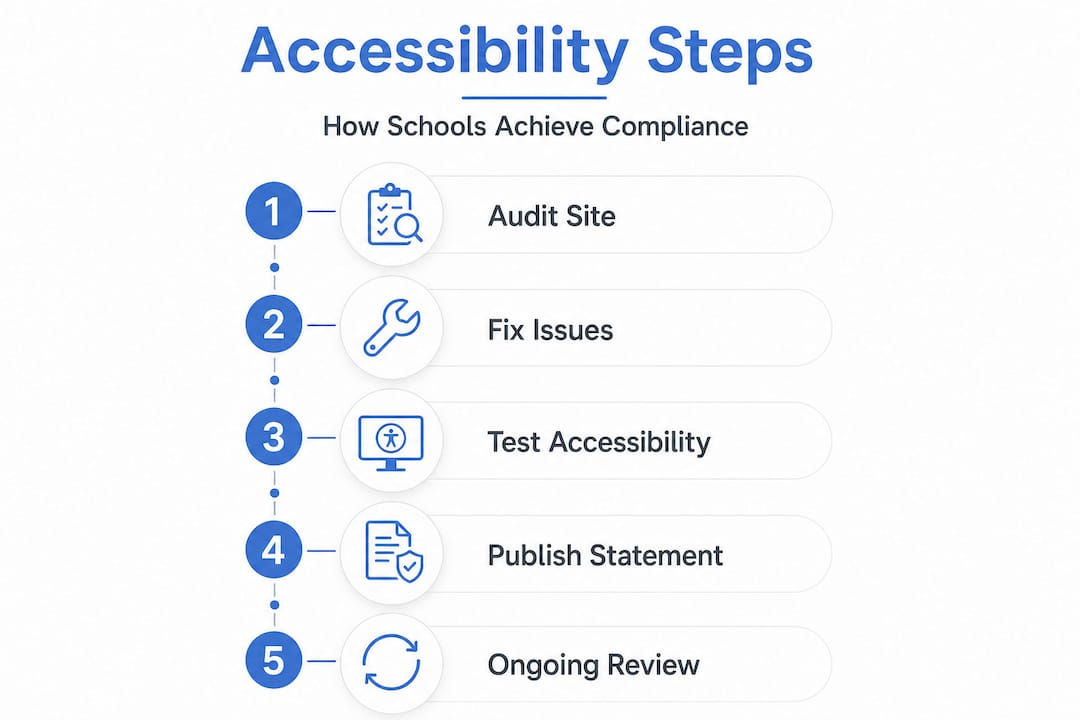
Understanding the standards is one thing. Putting them into practice is another. Here is a straightforward process you can follow to drive meaningful, lasting improvement.
- Conduct an accessibility audit. Use a combination of automated tools and manual testing with real users. Automated tools catch around 30 to 40 percent of issues; manual testing catches the rest.
- Prioritise by impact. Focus first on the pages your community uses most: the homepage, contact pages, key policies, and any parent-facing tools such as newsletters or event information.
- Fix structural issues first. Heading hierarchy, keyboard navigation, and colour contrast are foundational. Resolve these before tackling individual content items.
- Update content systematically. Go through existing PDFs, images, and videos and add alt text, captions, and accessible formats. Many schools find that a large proportion of inaccessible content sits in uploaded documents.
- Publish or update your accessibility statement. This is a legal requirement. Your statement must reflect your current status, known barriers, and your plan for resolving them.
- Train your team. Ensure that anyone who updates the website understands accessibility basics. One untrained staff member uploading an inaccessible PDF can undo months of progress.
- Schedule ongoing monitoring. As Public Sector Bodies Accessibility Regulations make clear, “benchmarking and governance typically require ongoing auditing/testing and communicating status via an accessibility statement.” Accessibility is not a one-time task.
Here is a comparison to illustrate what accessible and non-accessible features look like in practice:
| Feature | Non-accessible version | Accessible version |
|---|---|---|
| Images | No alt text | Descriptive alt text provided |
| Videos | No captions | Captions and transcripts available |
| Colour contrast | Light grey text on white | WCAG AA contrast ratio met (4.5:1+) |
| PDFs | Scanned image files | Tagged, text-based PDFs |
| Navigation | Mouse-only menus | Full keyboard and screen reader support |
| Forms | Unclear labels | Explicit labels and error instructions |
Pro Tip: Review school website case studies to see how schools similar to yours have approached accessibility improvements. Real-world website project examples show that significant compliance gains are achievable within typical school budgets and timelines.
Common pitfalls and how to avoid them
Even well-intentioned schools frequently make the same mistakes when approaching accessibility. Knowing what to watch for can save you significant time and reputational risk.
The most common pitfalls include:
- Treating accessibility as a one-off project. Accessibility degrades over time as new content is added. Every new page, image, or uploaded document is an opportunity for a new barrier.
- Relying solely on automated tools. Automated checkers are useful but incomplete. They cannot assess whether alt text is actually meaningful, or whether a form is genuinely intuitive.
- Publishing a generic or out-of-date accessibility statement. As Public Sector Bodies Accessibility Regulations require, “UK schools must audit and communicate their website’s accessibility status and progress through an accessibility statement.” A copied template that does not reflect your actual website is not compliant.
- Ignoring PDFs and documents. A significant proportion of inaccessible content on school websites sits in uploaded documents, particularly scanned policies and newsletters.
- Overlooking mobile accessibility. Many parents access school websites primarily via mobile. Test your site on multiple devices and screen sizes, not just desktop.
- Assuming a redesign solves everything. A new website built without accessibility baked in from the start can be just as problematic as the old one.
Your accessibility statement should include the following: the standard your site aims to meet (WCAG 2.1 AA), a clear description of any known accessibility barriers, contact details for users to request accessible formats, and a date showing when the statement was last reviewed.
Pro Tip: For multi-academy trusts managing multiple school websites, a unified approach to accessibility governance is essential. Explore MAT website compliance support to understand how a consistent framework can be rolled out across all trust schools simultaneously, reducing duplication of effort and ensuring coherent reporting.
Sustainable accessibility means building it into your content workflows, your editorial calendar, and your annual governance review cycle.
Why website accessibility is a catalyst for better school engagement
Here is a perspective that most compliance guides overlook entirely. Schools that treat accessibility as a tick-box exercise miss its most powerful benefit: the direct impact on community trust, engagement, and reputation.
When a parent with a visual impairment can navigate your website independently, they are not just accessing information. They are receiving a clear signal that your school values their inclusion. When a student with dyslexia finds your learning resources genuinely readable, it reflects your school’s wider commitment to every learner. These moments matter. They shape how families talk about your school, how staff feel about working there, and how governors assess your digital leadership.
We believe that accessibility is one of the most undervalued levers for improving school communication. Schools that have invested seriously in accessible, well-structured websites consistently report stronger parent engagement, fewer queries to the school office, and more confidence among their wider community. These are measurable outcomes, not abstract ideals.
The most forward-thinking school leaders we work with do not position accessibility as a compliance burden. They position it as a cornerstone of their school’s identity, a transparent window into their values and their commitment to every member of their community. Explore digital engagement strategies to see how accessibility sits alongside broader communication improvements that can transform the relationship between your school and its families.
Treating accessibility as a cultural priority, rather than a technical task, is what distinguishes schools that lead from those that merely comply.
Making accessibility easy for your school
At eSchools, we understand that school leaders are managing extraordinary demands on their time. Accessibility compliance should not add to that pressure. It should be built into your digital infrastructure from the start.

Our school website solutions are designed with statutory compliance at their core, incorporating WCAG AA standards, accessible templates, and structured content management that makes it straightforward for non-technical staff to maintain a compliant website. Whether you are a single school or a growing trust, you can see how we have helped schools like yours through our recent accessibility projects. For multi-academy trusts seeking coherent, scalable compliance across multiple sites, our MAT compliance support offers a structured, supported pathway to meeting your obligations with confidence. Get in touch with our team today to find out how we can help your school lead with accessibility.
Frequently asked questions
What does an accessibility statement for school websites include?
Your accessibility statement must explain your compliance with accessibility regulations, detail any known issues or barriers, provide contact information for users who need accessible alternatives, and set out a clear plan for addressing outstanding issues.
Who checks if my school’s website is accessible?
Regulators such as the Government Digital Service or the Equality and Human Rights Commission can audit school websites for compliance, and schools may also face scrutiny during Ofsted inspections if accessibility failings indicate broader inclusion concerns.
How often should we test our school website for accessibility?
Test your website at least annually and after any significant updates or redesign, since ongoing auditing and testing is required under the Public Sector Bodies Accessibility Regulations to maintain compliance and reflect your current accessibility status accurately.
What is WCAG and which level is required?
WCAG is the Web Content Accessibility Guidelines, the internationally recognised framework for digital accessibility, and UK school websites must conform to at least level AA, meaning your site must meet the standard requirements for perceivability, operability, and understandability.