
TL;DR:
- Many UK schools hesitate to adopt cloud-based learning due to concerns about complexity, security, and costs. Cloud solutions reduce staff workload, lower costs through shared resources, and improve data security and student engagement. Successful adoption depends on thorough planning, phased implementation, staff training, and infrastructure upgrades.
Despite years of digital progress across UK education, many school leaders still hesitate before adopting cloud-based learning. Concerns about complexity, data security, cost, and disruption continue to delay decisions that could genuinely transform how staff work and how students learn. Yet 61% of UK school leaders now report reduced workload directly linked to technology adoption. This article cuts through the myths, presents the real evidence, and gives you a clear framework for evaluating whether cloud-based learning is the right move for your school or multi-academy trust (MAT).
Table of Contents
- What is cloud-based learning?
- Key benefits for schools and trusts
- Challenges and risks to consider
- Best practices and steps for smooth adoption
- An expert view: what most discussions on cloud-based learning miss
- Discover the right cloud-based tools for your school
- Frequently asked questions
Key Takeaways
| Point | Details |
|---|---|
| Workload and cost savings | Cloud solutions reduce admin time and deliver tangible cost benefits for schools and MATs. |
| DfE-compliant and secure | Cloud platforms can meet Department for Education and GDPR standards for security and compliance. |
| Risks and mitigations | Digital divides, vendor lock-in, and outages are real but manageable with phased, well-supported rollouts. |
| Hybrid adoption is pragmatic | Fully cloud is not always optimal; many schools thrive using a strategic mix tailored to their needs. |
What is cloud-based learning?
Cloud-based learning refers to any digital teaching, assessment, or management service that is accessed over the internet rather than installed on local hardware. Instead of relying on servers physically located in your school building, data and applications live on secure, remotely managed infrastructure. Staff, students, and parents can access them from any authorised device, anywhere, at any time.
This is a meaningful shift from traditional on-premise systems, where a school’s IT team manages servers, handles updates, and responds to hardware failures. On-premise setups can be costly to maintain, difficult to scale, and vulnerable to single points of failure. Cloud solutions move much of that burden to specialist providers while giving schools centralised, policy-driven control.
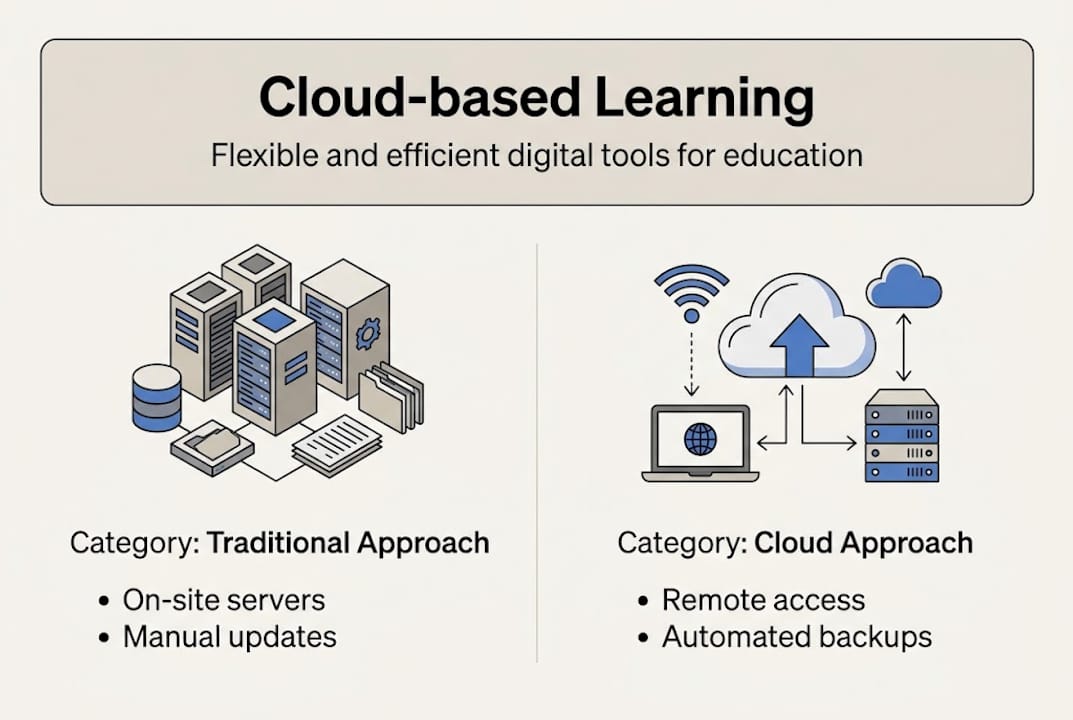
The term covers a broad range of tools. Consider the comparison below:
| Feature | On-premise system | Cloud-based solution |
|---|---|---|
| Data storage | Local servers | Secure remote infrastructure |
| Access | School network only | Any authorised device, anywhere |
| Updates | Manual, IT-managed | Automatic, provider-managed |
| Scalability | Limited by hardware | Flexible, subscription-based |
| Disaster recovery | Costly and complex | Built-in, often automatic |
| Compliance management | School’s responsibility | Shared responsibility model |
Core features you should expect from a well-designed cloud-based learning environment include:
- Secure online storage with role-based access controls
- Anytime, anywhere access for staff, pupils, and parents
- Centralised management for administrators and MAT leaders
- Automatic compliance updates aligned to DfE requirements
- Integration with existing tools such as management information systems (MIS)
The Department for Education (DfE) itself guides schools towards platforms that meet recognised standards. Cloud solutions boost security, scalability, and compliance, particularly through frameworks like Microsoft 365 A3/A5 licensing. Understanding what cloud-based learning actually entails is the first step. To explore this further, our guide to virtual learning environments sets out how these platforms function within UK school settings specifically.
Key benefits for schools and trusts
Now that the basics are clear, examine why so many schools are making the switch. The evidence is strong, and the benefits are tangible across four key areas.
Reduced staff workload and administrative burden
Teachers and school leaders consistently cite workload as their biggest challenge. Cloud-based tools automate routine tasks such as attendance tracking, report generation, and communication logging. According to sector analysis, 61% of school leaders report reduced administrative workload, while 31% identify direct cost savings linked to cloud adoption. These are not marginal gains. For a secondary school managing hundreds of students across multiple departments, automating even one administrative process per week frees significant staff time.

Cost efficiencies through shared resource models
On-premise infrastructure requires ongoing capital expenditure for servers, licences, and maintenance contracts. Cloud models typically use subscription pricing, which converts unpredictable capital costs into manageable operational expenditure. MATs benefit especially from centralised procurement, where a single cloud contract covers all schools in the trust. This shared resource model reduces duplication and makes budgeting more predictable. For practical guidance on streamlining school operations, operational efficiency tools can make a significant difference here.
Enhanced safeguarding, security, and compliance
Data security is a legitimate concern for every school leader. The good news is that reputable cloud providers invest in security infrastructure that most individual schools could never afford to replicate independently. More than half of UK schools report enhanced flexibility and security after adopting cloud-based technology. Automatic updates ensure compliance with evolving DfE and Ofsted requirements, and multi-factor authentication protects sensitive data.
Greater teaching flexibility and improved student engagement
Cloud-based platforms allow teachers to set and mark work remotely, provide real-time feedback, and personalise learning pathways. Students gain access to resources outside lesson time, supporting revision, catch-up, and independent study. Evidence on improving student outcomes consistently points to the role of flexible, accessible digital tools in raising attainment. For ideas on enhancing online learning, there are practical approaches that work well in UK classrooms specifically.
Key benefits at a glance:
- Reduced time spent on administrative tasks
- More predictable, manageable IT costs
- Stronger data security and GDPR compliance
- Flexible access for staff and students from any location
- Improved parental engagement through digital communication tools
Pro Tip: Before approaching any provider, map out the three or four administrative tasks that consume the most staff time each week. Use this as your benchmark to evaluate whether a cloud platform genuinely addresses your school’s biggest pressure points.
| School type | Primary benefit reported | Adoption rate (2024/25) |
|---|---|---|
| Single primary school | Reduced admin workload | Growing rapidly |
| Single secondary school | Cost savings and flexibility | Majority already adopted |
| Multi-academy trust | Centralised management | Accelerating across the sector |
Challenges and risks to consider
With strong benefits on show, it is essential to remain realistic about the challenges schools face. Cloud adoption is not without its complications, and responsible decision-making means weighing them honestly.
“The benefits of cloud adoption far outweigh the risks for most schools, but institutions must plan carefully for vendor dependency, migration complexity, and the risk of deepening digital inequality among pupils from lower-income households.”
Infrastructure and connectivity gaps
Not every school has the broadband capacity or device availability to support a full cloud migration. Rural schools, in particular, may face latency issues that make cloud-dependent systems frustratingly slow. This is not a reason to avoid cloud adoption, but it is a reason to audit your infrastructure before committing to any platform. Risks including vendor lock-in, upfront migration costs, staff training demands, and digital divide concerns are well-documented challenges that require active mitigation strategies.
Data privacy and GDPR obligations
When you move pupil data to a third-party cloud provider, your school remains the data controller under UK GDPR. You must ensure your provider processes data lawfully, transparently, and securely. This means reviewing data processing agreements carefully and ensuring your chosen platform stores data within approved jurisdictions. The importance of technical support cannot be overstated here, as ongoing compliance depends on your provider responding promptly to any concerns.
Vendor dependency and service outages
No cloud platform is immune to downtime. Real-world incidents, such as vendor outages affecting school MIS systems, demonstrate that over-reliance on a single provider without contingency planning can disrupt operations at scale. A sensible approach involves maintaining offline backups for critical data and building redundancy into your IT strategy.
Steps to mitigate the key risks:
- Conduct a full connectivity and device audit before beginning procurement
- Review all data processing agreements against UK GDPR requirements
- Choose providers with clear service-level agreements (SLAs) and uptime guarantees
- Build contingency procedures for system outages affecting critical functions
- Develop a phased adoption plan that allows staff to adapt gradually
Pro Tip: When evaluating providers, ask specifically for their uptime statistics from the past 12 months and their documented incident response process. A trustworthy provider will share this information openly. For strategies on driving digital engagement while managing risk, a phased, evidence-informed approach consistently delivers better results than a rapid full-scale switch.
Best practices and steps for smooth adoption
Recognising the risks, you need a proven route to cloud success. The following framework draws on DfE guidance and real-world experience across UK schools and MATs.
Step 1: Conduct a thorough needs analysis
Before selecting any platform, map your current processes. Identify which administrative, teaching, and communication tasks are most time-consuming or error-prone. Engage stakeholders, including teachers, IT staff, governors, and even parents, to understand their priorities. This consultation stage often reveals needs that IT coordinators alone would not identify.
Step 2: Align procurement with DfE frameworks
The DfE provides clear procurement standards to ensure schools invest in value-for-money, compliant solutions. DfE standards and frameworks ensure safer procurement, more measurable return on investment (ROI), and well-managed phased transitions. Buying outside these frameworks can expose schools to unnecessary financial and compliance risk. Always check whether a prospective provider is listed on an approved framework before entering negotiations.
Step 3: Prioritise robust training and ongoing support
Technology adoption fails most often not because the software is poor, but because staff do not feel confident using it. Allocate dedicated time for training before go-live, and build in refresher sessions as features are updated. Look for providers who offer accessible, ongoing support rather than a one-off implementation package. Strong support structures are as important as the platform itself.
Step 4: Upgrade infrastructure in parallel
If your connectivity or device provision is insufficient, no cloud platform will perform well. Work with your local authority or regional school improvement team to identify funding routes for infrastructure upgrades. The DfE’s compliance steps also touch on how digital infrastructure connects to broader statutory requirements.
Step 5: Use a phased, hybrid approach
Migrating all systems at once is rarely advisable. Start with lower-risk areas such as communication tools, document storage, or parent-facing platforms. Use these early wins to build staff confidence and gather evidence of impact before extending cloud adoption to more critical systems such as assessment or MIS.
| Adoption phase | Systems to prioritise | Expected timeline |
|---|---|---|
| Phase 1 | Communication tools, document storage | 1 to 3 months |
| Phase 2 | Learning management and homework platforms | 3 to 6 months |
| Phase 3 | Assessment, reporting, and MIS integration | 6 to 12 months |
| Phase 4 | Full MAT-level centralised management | 12 months onwards |
Pro Tip: Identify two or three enthusiastic early adopters on your staff team. Their positive experiences will do more to win over sceptical colleagues than any formal training session. Peer-led adoption is consistently more effective in educational settings.
An expert view: what most discussions on cloud-based learning miss
Most articles on cloud-based learning focus on the technology itself. What they rarely address is the cultural and planning gap that determines whether adoption succeeds or stalls.
We see schools across the UK rush towards a “fully cloud” position because it feels modern and forward-thinking. In practice, this approach creates unnecessary disruption, particularly for rural MATs or schools with ageing infrastructure. Experts consistently advise that the benefits far outweigh the risks when planning is robust, but that hybrid models remain essential for managing legacy systems and building genuine resilience.
The uncomfortable truth is that the schools achieving the strongest outcomes from cloud adoption are not the ones with the most sophisticated platforms. They are the ones that invested time in stakeholder engagement, inclusive planning, and honest infrastructure assessment before signing any contract. A well-supported, user-friendly edtech solution that staff actually use will always outperform a feature-rich platform that sits underutilised.
True value lies as much in how you plan and support adoption as in which software you choose. That is the insight most cloud conversations still miss.
Discover the right cloud-based tools for your school
If you are ready to move from evaluation to action, eSchools offers practical, proven tools designed specifically for UK schools and MATs. With over 14 years of experience supporting schools through digital transformation, we understand the real pressures you face.

Our learning platforms are built to be simple for staff and engaging for students, removing the friction that stalls adoption in so many schools. Whether you are a single primary school taking your first steps or a large MAT seeking centralised management, our MAT cloud solutions scale to your needs. For further guidance before you decide, explore our practical cloud learning advice to see how schools like yours are making it work. Get in touch today to arrange a conversation with our team.
Frequently asked questions
Does cloud-based learning improve student outcomes?
Cloud-based learning supports improved outcomes by providing flexible access to resources, enabling timely feedback, and encouraging collaboration. Digital tools including cloud learning aid attainment in 66% of UK schools surveyed in 2024 to 2025.
What about data security and GDPR with cloud services?
Reputable cloud platforms offer strong security and DfE-aligned GDPR safeguards, particularly when schools use approved frameworks. Cloud platforms like Microsoft 365 offer improved security, scalability, and compliance when procured correctly.
How do schools transition to the cloud without disruption?
The most effective approach starts with non-critical systems, invests in thorough staff training, and follows a clear phased plan. Phased adoption mitigates disruption and allows schools to measure outcomes at each stage before proceeding.
Are there significant risks to using cloud-based learning?
Vendor lock-in, service outages, and digital inequality are genuine risks that require proactive management. Risks include vendor lock-in, migration complexity, and digital divide effects, all of which can be substantially reduced through careful planning and hybrid adoption models.